Illustrator Logo PNG
The Adobe Illustrator logo symbolizes the precision and professionalism of the popular graphic design software. Its strict, concise style emphasizes the product’s intended use by designers and its functional focus.
Illustrator began in the mid-1980s, when Adobe moved beyond PostScript and started developing software for professional designers. John Warnock wanted a digital tool that could replace manual graphic work while preserving precision. The first version appeared in January 1987 for the Mac. It used Bézier curves to create scalable vector artwork for logos, type, and print illustration.
Early promotion used Botticelli’s Venus recreated with the program, presenting Illustrator as a serious creative tool. Expansion to Windows proved harder. CorelDRAW, released in 1989, became a strong rival on IBM-compatible computers, with a broad toolset and aggressive pricing that kept competition intense through the first half of the 1990s.
A major shift came with Illustrator 7 in 1997, when both platform versions finally offered matching functionality. Designers could move between systems with fewer workflow differences, while companies using mixed hardware gained one common vector package. During the late 1990s and early 2000s, releases added transparency, advanced gradients, 3D effects, and stronger typography tools.
In 2003, Illustrator joined Creative Suite alongside Photoshop and InDesign, improving file compatibility across the product family. In 2013, it moved to the Creative Cloud subscription model, replacing perpetual licenses and prompting debate over recurring costs. Later versions expanded support for web design, 3D work, mobile workflows, and newer digital production methods.
Meaning and History
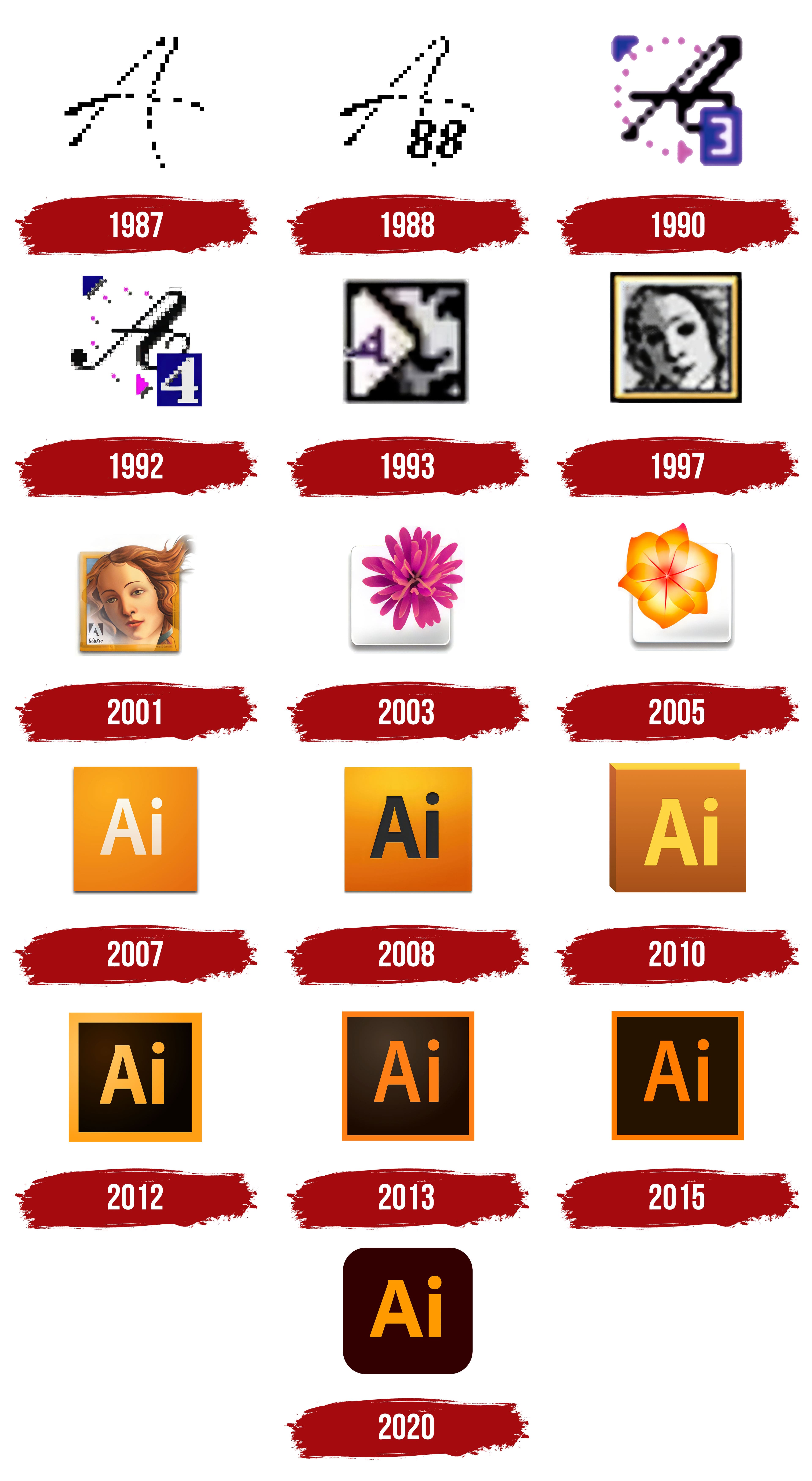
What is Illustrator?
It is a popular professional tool for creating vector graphics. The application is designed for logos, fonts, illustrations, and promotional materials. Its unique feature is its ability to handle mathematical objects, ensuring perfect sharpness at any scale. Users appreciate its convenience in managing Bezier curves, gradients, and textures.
1987

The first Illustrator logo appeared in January 1987, when the company released version 1.0 under the codename Picasso. Two months later, in March, version 1.1 was released as Inca, with a slightly adjusted composition, but the core image remained the same.
The emblem was built around a large, handwritten black “A”. The contour had a grainy texture, giving the impression of a pixelated edge. This structure referred to the visualization of Bézier curves on early Macintosh screens, where anti-aliasing was limited, and every contour retained a “raster trace.”
The composition was based on a simple form without additional elements. The letter was perceived as a symbol of a new tool for working with vector objects, yet it reflected the pixel-based character of computer graphics familiar to the audience.
1988

In 1988, Illustrator received an updated version, 1.6, for Macintosh, officially released in March. Compared to the debut emblem of 1987, a small but notable change was introduced: in the lower right corner of the letter “A,” the mark “88.” It referred to the year of release and emphasized the program’s link to a specific edition.
The foundation was still the large, handwritten, black “A” with a pixelated edge effect. The typographic part was limited to the symbol “A” and the “88” index. The palette remained minimal: a black mark on a white background.
The numeric index was introduced for practical purposes, meant to visually distinguish the new stage of the program from the 1987 version and indicate product evolution. Against the backdrop of competition with Aldus FreeHand, this distinction carried symbolic weight: Illustrator signaled renewal and growth in its toolset.
Proof of success came quickly: by 1989, the product received the Byte Awards in the “Distinction” category. The “88” emblem was thus associated not only with the release date but also with Adobe’s growing status in vector graphics.
1990

In October 1990, Illustrator 3.0 was released, introducing a new mark that reflected the energy of the new decade. Compared with the minimalist versions of the late 1980s, the composition became richer and more dynamic.
The foundation was still the black “A,” now more massive and slightly slanted. Around the symbol was a circle of fuchsia dots forming a pattern that evoked the sense of movement associated with the digital technologies of that time.
In the lower-right part of the composition was a purple rectangle with a white numeral “3.” It indicated the program version and became the key to its identification. For visual balance, a purple triangle was placed in the top-left corner, tying the structure together.
The typographic element was represented by the number “3” inside the rectangle. It stood out through the contrast of white against the saturated background and served the practical function of indicating the release.
The palette featured a combination of purple and bright magenta tones. This set highlighted the experimental spirit of the early 1990s computer industry, when new visual languages for the digital environment were being sought.
Illustrator 3.0 was released for Macintosh and other platforms, including NeXT, SGI, and Solaris, reinforcing the symbol’s significance as a mark of international expansion.
1992

In spring 1992, Illustrator launched on a new platform: version 4.0 for Windows, codenamed Kangaroose, accompanied by a redesigned mark. It developed the image introduced two years earlier in version 3.0, but with different accents.
The main letter “A” became heavier: its lines thickened, and its silhouette grew heavier. The circle of dots around the symbol disappeared, replaced by pixel squares with gray shadows, referencing the aesthetics of Windows interfaces and signaling a departure from the Macintosh style.
In the lower-right corner was a dark blue rectangle with a white number “4.” The numeral was larger than in the previous version, reinforcing its role in the structure. For balance, a blue triangle was added to the top-left corner, echoing the rectangular block’s color. The lower pink marker was retained but with a deeper shade and shadow. The entire composition appeared more cohesive.
1993

In the summer of 1993, the fifth version of Illustrator was released under the codename Saturn. Along with it, the company introduced a new mark that differed dramatically in style from previous logos.
The composition was built around the silhouette of Venus’s face and executed in monochrome. The image occupied the entire field. On the left side was a vertical, white rectangle that partially covered the eye area. Inside the block was a purple letter “A,” which became the focal point, standing out against the portrait’s background. The combination of a classical image and digital presentation linked the program to two traditions: artistic and technological.
In the typographic execution, the emphasis was placed on the letter “A.” The color palette was limited to a monochrome base, a white rectangle, and a purple accent. The contrast created a clear hierarchy, with attention focused on the combination of the letter and the silhouette.
The Venus symbol was a reference to the Renaissance, when art and technique developed in parallel. From its earliest versions, Illustrator adopted this image as a symbol of mastery of Bézier curves. In the 5.0 logo, this continuity was reinforced, while the release on Macintosh System 7 emphasized the product’s technological novelty.
1997

May 1997 marked the release of Illustrator 7.0, codenamed Simba. Along with the new version came a redesigned mark that reflected the program’s transition to a unified standard for Windows and Macintosh. This reinforced the product’s position in the professional environment where the choice of platform was becoming less relevant.
The composition once again used a fragment of Venus’s portrait from Botticelli’s painting. However, unlike earlier interpretations featuring the letter “A” and additional geometric inserts, the mark was now constructed on a square frame with a darkened background. Venus’s face filled the entire space, and a thin golden border ran along the edges, giving the Illustrator emblem a sense of completeness and monumentality.
The composition focused on the artistic image. The color palette followed the contrast of the darkened field and the golden outline.
The choice of Venus as a mark remained consistent with the tradition established in the early versions of Illustrator. It maintained the product’s connection to the cultural heritage of the Renaissance, in which harmony and refinement of form were valued.
2001

In November 2001, Illustrator 10 was released, and with it, the brand mark received a new design. For the first time, the portrait of Venus, which had long remained monochrome, was presented in color. The skin acquired soft, warm tones, and the hair shone with golden highlights, extending beyond the frame to create a sense of spatial expansion. This emphasized the program’s artistic character and strengthened its connection to the pictorial heritage.
The square frame remained, but now it looked more substantial: the golden outline enhanced the composition’s sense of completeness. The background behind Venus was kept neutral to keep attention focused on the face and flowing hair.
For the first time, the company’s corporate mark appeared on the emblem as a light-gray Adobe logo in the lower-left corner. Next to it was the inscription “Adobe Illustrator.”
The color palette was created by contrasting golden hair tones with warm skin and a calm, neutral background. The addition of a metallic frame outline conveyed a sense of value and elevated the visual composition.
The release had particular significance for the product: Illustrator 10 was the first version in which interfaces and functions were synchronized between Windows and Macintosh.
2003

The new Illustrator CS image symbolized a move away from classical icons featuring historical motifs. Instead of the portrait of Venus, viewers saw a three-dimensional fuchsia-colored flower. It was placed in the upper corner of a white square and visually extended beyond the block, creating a sense of spatial depth.
The debut coincided with the launch of Adobe Creative Suite in October 2003. The company introduced a product line, built on a unified style that incorporated organic metaphors and natural aesthetics. In this context, the flower image for Illustrator became a landmark, marking the shift to a renewed visual concept.
The composition was based on contrast: the white background highlighted the rich petals that shifted softly from purple to pink. The gradient made the flower the main object and reinforced the association with the program’s expanded creative capabilities.
The mark was associated with the introduction of three-dimensional tools in Illustrator CS. The petals with smooth color transitions embodied creative freedom and demonstrated the technological shift that the company emphasized.
2005

An updated mark accompanied the appearance of Illustrator CS2 in April 2005. This version, codenamed Zodiac, developed the floral concept but changed the symbolism. Instead of the previous image, it presented an orange bud, emphasizing soft gradients and the petals’ plasticity. The design was first shown with the program’s April 27 release and served as a key visual marker for the package.
The white square acted as the base of the composition. Along its edges, a light shadow ran, creating the illusion of depth and elevation. The flower was placed in the upper-left sector, serving as the dominant element. The petals’ forms were based on smooth curves that emphasized dynamism. The visual scheme was limited to the mark without typographic support, consistent with Adobe’s overall identity across the Creative Suite.
The palette was based on warm shades of orange and red. Gradient transitions enhanced depth and created the impression of light moving inside the form. The tonal relationship was built so that the focus fell on the opening flower while the background remained neutral.
The flower image was interpreted as a symbol of energy and vitality. The warm palette referred to creativity, while the floral theme reflected Adobe’s intention to visually unify Creative Suite products around a natural metaphor.
2007

In March 2007, Adobe introduced Illustrator CS3 as part of Creative Suite, introducing a new system of brand marks. The presentation took place on March 27, and the release was part of a merger that brought Macromedia products together with the company’s own developments. This required a unified visual concept that would work equally well for dozens of applications while distinguishing them within the lineup.
A minimalist grid of color squares replaced the previous floral motifs and their associated mythological meanings. Each block had its own color and contained a two-letter abbreviation. Illustrator received an orange square with a gradient fill and the letters “Ai.” Photoshop was released with a blue module marked “Ps,” while InDesign received a pink module marked “Id.” This allowed programs to be identified by color and symbol while maintaining a shared visual code family.
The emblem’s geometry was simplified to a square, filled with a smooth gradient from light to more saturated tones. No ornament or complex construction was applied. The abbreviation was centered, ensuring proportional balance and compactness.
The typography used a sans-serif font in bold weight. The letters were light beige, creating contrast with the rich background. Straight forms and accentuated strokes characterized the typeface.
The Illustrator palette was set in orange-yellow gradients. The combination of warm shades evoked associations with energy and creativity. In the context of the suite, the color reinforced Illustrator’s position as a tool for drawing and visual expression.
2008

The Illustrator emblem received a new design with the release of Creative Suite 4. The updated mark appeared in October, along with the program, and accompanied the introduction of new features, including multiple artboards for the first time, the Blob Brush tool, improved gradients, and the integration of elements from FreeHand. The combination of visual and functional changes highlighted the program’s transition to a more mature professional tool.
The mark’s shape remained square, adhering to the Creative Suite color module principle, but the palette was adjusted. The orange background deepened and became more saturated, with a gradient that lent a sense of volume. The composition remained concise, but the new tones altered perception, making the symbol visually denser.
Typography was slightly refined. The “Ai” letters were no longer light but dark gray. Inner shadows formed a slight relief, giving the impression of being pressed into the background. Details were updated: the dot over the “i” was enlarged and thickened, and the tail of the “A” was accentuated, giving the composition a more structured appearance.
2010

The change of the Illustrator logo coincided with the release of the fifteenth version, CS5. The program was presented as part of Creative Suite and received a new mark that reflected Adobe’s overall branding concept of the early 2010s. All products in the line unified their icons into three-dimensional blocks with letter abbreviations and signature colors, reminiscent of the structure of chemical elements. For Illustrator, this meant transitioning from decorative squares to a stricter, minimalist style while maintaining a three-dimensional effect that reinforced the tool’s professional image.
For the first time, the symbol had depth and a slight perspective, visually resembling a closed box or a book. This distinguished CS5 from previous versions and highlighted Adobe’s intention to convey depth and systematization. The geometry was based on a rectangular block with defined edges, creating the illusion of space.
The “Ai” type on the front was painted bright yellow, and the strokes and dot over the “i” were thickened, giving the letters weight and expressiveness. The typeface retained its recognizable character but became bolder.
The background palette was designed with a smooth transition from a saturated orange at the top to a warm, slightly brownish tone at the bottom. The gradient fill reinforced the volumetric effect, making the composition appear layered and three-dimensional.
2012

The final stage of emblem development within the Creative Suite framework came with Illustrator CS6. The program was introduced in April 2012 and released in May under the codename Ellora. The symbol became the last in this series, after which the company moved to a different design model with Creative Cloud.
The visual concept was based on a square form, but its interpretation gained a more intense expression. The background was a saturated dark brown-orange, framed by a border matching the lettering color. This connected the text and field into a single block, giving the emblem a monumental character and reinforcing its place within the broader Adobe product system.
The typeface maintained continuity from CS5 but appeared heavier in the new setting. The “Ai” abbreviation was built on a smooth, orange-yellow gradient: the left side was illuminated, while the right side was darkened. This created the impression of volume, as if the letters were lit from one side and pressed in from the other.
The palette was based on the contrast between the dark background and the bright letter spectrum. The gradient-enhanced depth, while the frame defined the mark’s boundaries, turned the composition into a flat one.
2013

A change in the visual system accompanied Illustrator’s transition to Creative Cloud in 2013. In June, Illustrator CC was released with a new emblem that symbolized the shift to Adobe’s subscription-based distribution model and the unification of the product line into a single system.
The design abandoned three-dimensional effects. Instead of volumetric blocks, a flat construction emerged, with the square remaining the main form, while the background looked calmer and stricter. The primary tone was dark brown with a thin orange border around the perimeter.
Inside was the abbreviation “Ai.” The letter color was bright orange, visually echoing the frame’s border. Compared to the previous version, the typeface maintained continuity, but the lines appeared thinner. The sans-serif style was preserved and consistent across the entire Creative Cloud line, with each product receiving a two-letter abbreviation.
The palette was built on the contrast between the dark background and the saturated orange. Despite the flat interpretation, a slight lightening was present in the center of the square, creating the impression of a soft inner glow. This softened the composition’s strictness and added depth.
2015

The redesign of the Illustrator emblem in 2015 was part of a Creative Cloud update presented on June 16. Version 19 received a new mark in which Adobe firmly established the flat style, with no hints of volume or complex transitions.
The square form remained, but the background lost its previous subtle gradients and appeared flat. The base was a dark brown block outlined by a bright orange frame. The inner area, despite its strictly flat surface, had a subtly warm tone that added depth while retaining its minimalist character.
The typeface did not undergo fundamental changes. The “Ai” abbreviation retained its sans-serif style and proportions but lost the remaining shadows and dimensional effects. The letters’ orange color became slightly more saturated than in the previous version, and the thickened strokes and dots emphasized their energy.
The palette was built on the interaction of two tones: the dark brown background and the intensified orange of the letters and frame. A difference of one or two shades compared to the 2013 version made the mark more dynamic while maintaining overall restraint.
2020

The redesign that accompanied Illustrator CC 2020 was introduced in fall 2019 and was used throughout the following year. It was another step toward simplifying the Creative Cloud visual system.
The most notable change was the addition of rounded corners to the square. The rectangular form, previously strict and rigid, now appeared softer and more in line with current interface trends. The border disappeared, making the composition more unified and flat.
The background kept its brown base, but the tone was lighter than before, giving the updated Illustrator logo a fresher character. On this field stood the letters “Ai,” rendered in a light orange shade. Compared to previous versions, their color looked brighter and more contrasting.
The typeface retained its familiar sans-serif appearance, but the glyphs became heavier. With increased stroke thickness, the abbreviation looked bolder and more compact.
The Illustrator CC 2020 composition demonstrated a simplified structure and a modern interpretation of the mark. Rounded corners, a lighter background, and bright letters created an image that combined minimalism with digital interface trends.